Amaranth - Nightwish - 2007

Showing posts with label Utility-HDD Tool. Show all posts

Sep 12, 2007

Hard Drive Inspector Pro 2.47.427
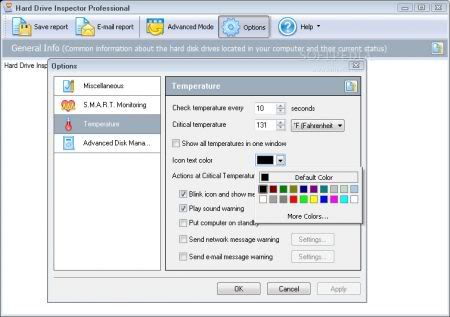
Hard Drive Inspector is a powerful, effective and easy-to-use program that monitors hard drive health. The value of information stored on an average computer hard drive often exceeds the value of the computer itself. But a hard drive is one of the most unreliable internal computer devices. When it crashes (which happens quite frequently), the stored information will be lost fully or partially. Subsequent information recovery is either not possible at all, or constitutes a very sophisticated and expensive procedure that can be performed only by specialists.

Modern hard drives support S.M.A.R.T. (Self-Monitoring, Analysis, and Reporting Technology) that was specially developed to detect upcoming disk failures. Using this technology Hard Drive Inspector can monitor the current state of various life-critical parameters describing a disk's reliability and performance. Hard Drive Inspector analyzes this data and warns the user if the parameters indicate a critical reduction of disk reliability. Timely alerts make it possible to copy the data and replace an unreliable disk, thus preventing information loss.

Platform: 2000/XP/2003 Server/Vista
Languages: English, Russian, Norwegian, Italian, German, Hebrew, French, Spanish, Dutch-Belgium, Slovak, Arabic, Vietnamese, Ukrainian, Portuguese-Brazil, Chinese-Taiwan, Czech, Greek, Hungarian, Bulgarian, Belorussian, Portuguese, Indonesian, Polish

Homepage
Download (3.27 MB)
Mirror
Mirror
Password: softarchive

Aug 17, 2007

HDD Life Pro 3.0.138

Home users will find HDDlife simple and pleasant to use, while system administrators will appreciate its advanced and powerful features. HDDlife knows everything about your disks and shares its knowledge with you in your favorite way - from seeing the well-being of your hard drives at a glance to getting remote notifications about developing problems over a network.

Hard Drive Health Control with S.M.A.R.T.
HDDlife controls the health of your hard drives with the S.M.A.R.T. technology, and warns you about potential problems the moment they start developing. Prevent data loss by discovering a possible hard drive failure before it happens!

Continuous Monitoring and Regular Checkups
HDDlife monitors your hard drive's health and performance in the background - all the time! You can set your own check-up schedule to prevent performance degradation and untimely warnings.

See It Right the First Time with JustNow!™
HDDlife employs a trademarked unique technology called JustNow!™ that allows you to see the health and performance of your hard drives immediately when you start HDDlife. JustNow!™ displays the health and performance figures as a percentage of a brand new disk. No more waiting for a lengthy surface scan! No need to monitor your hard drives for an extended period of time. No competing products can do the same!

Protect Your Backups
HDDlife supports external hard drives connected over USB. You'll see immediately if your backups are in danger because of a problem developing in an external drive!

Save Power
HDDlife is not limited to monitoring your disk's health. It can cut your power bills by reducing your disk's power consumption - a truly unique feature which is invaluable if you are managing a bunch of computers!

.....

Homepage
Download (5.38 MB)
Mirror
Password: softarchive.net

Mar 26, 2007

UltimateDefrag 1.47

UltimateDefrag is the world's most powerful defragger in terms of the file placement flexibility it gives you for defragging and strategically placing files on your hard drive - right down to the individual file level. With The Defragger And File Placement Optimizer That Lets You Defrag & Optimize Your Hard Drive - Any Way You Want To!

UltimateDefrag is the Ultimate Defragger and File Placement Optimizer. Defragging hard drives helps to restore your hard drive performance. File placement optimizing on the other hand, boosts your theoretical hard drive file access performance by up to 300% of manufacturers quoted averages (typical performance increase you'll experience is between 25 and 100%) by placing the files you want performance from onto the faster performing (outer tracks) areas of your hard drive. With UltimateDefrag - you can specify which individual files, programs or games you want the best performance from. The "Archive" function places all of your unused files out of the way and onto the slower performing areas of your hard drive.

If you run complex games, simulations and applications, UltimateDefrag gives you the capability to place the files associated with these applications in the position on your hard drive that will give you the best performance possible.
Now watch your programs launch faster! Your games perform like they never have! Experience a Windows Desktop and Operating System with the same sprightly performance as when your PC was brand new!

UltimateDefrag Features:
• Achieve Optimum Performance Hard Drive File Access That Gives You A Much More Responsive PC
• Strategic File Placement Gives You Complete Control Over Which Files And Programs You Want Increased Performance From
• Place Unused Data (such as ZIP Files and unused Windows files) Out Of The Way
• Place Directories In The Optimum Position For Superior Performance
• Defrag with as little as 1% FREE space
• Enjoy fast 3 to 5 minute complete defrags
• Choose From 4 Powerful Defrag Methods With Over 33 Defrag Option Combinations
• Make Full Drives Perform Almost Like They've Been Newly Formatted
• You No Longer Need To Consider Partitioning - UltimateDefrag Is Like Partitioning-On-The-Fly!
• The First Complete "DISK" Metaphor In Any Defragger
• Say Goodbye To "Hard Drive Fatigue" Forever!
• Based Upon True Scientific And Natural Laws
• More Than Just A Defragger - It's Also a File Placement Optimizer
• Defragging Defrags Your Files - UltimateDefrag Defrags Your File System
• Nothing "Black Box" about this - you have total control over which files go where
• Flexible Scheduling lets you defrag while you're away from your computer
• All This In An Incredibly Powerful Program That's Less Than 1 Mb In Size!

Changes in UltimateDefrag 1.47 :
SIGNIFICANTLY ENHANCED DEFRAG SCHEDULING
- Minimize To System Tray (Hide When Minimized) Function Added
- Detect and Disable (upon user's consent) Windows BootOptimize state in Windows Registry
- When you go into Tools=>Options menu to select optimization options, the Options dialogue box remembers the drive that you have selected in the main user interface. This avoids inadvertently selecting options for the wrong drive.
- Changes made to the configuration are now automatically saved immediately and on exit. Previously this would only be saved on exit resulting in possible loss of last changes made to UltimateDefrag configuration in the event of abnormal termination of the program.
- Confirm Before Exit. If you attempt to exit the program when file operations are in progress you will be warned that file operations are currently in progress.

Homepage
Download (3.67 MB)
Password: www.softarchive.net

Feb 4, 2007

Raxco PerfectDisk 8.0 Build 50 Professional Retail

Raxco Software, the leader in disk defragmentation, now provides the power of enterprise defragmentation for desktop and laptop users with PerfectDisk. PerfectDisk's easy to use interface and powerful defrag engine were designed for users who do not require the capabilities of network defragmentation and advanced features for the enterprise.PerfectDisk is a software that helps you to defrag disks. If you want to optimize your computer to run faster and perform better so you can do more – whether work or surfing the Web – and don't run in a networked environment like many companies, then PerfectDisk is for you. PerfectDisk® 8 Version delivers speed, thoroughness, and ease-of-use for all Windows® home, small business, and large enterprise users.

PerfectDisk® Version 8.0, the world's most popular and thorough disk defragmentation solution, combines speed, thoroughness flexibility, control and ease-of-use to help improve PC and server performance. Global enterprises benefit from faster computers through regular, automated, unattended defragmentation with PerfectDisk. Certified by Microsoft® for Windows, PerfectDisk is designed for today's largest disk drives. With PerfectDisk's Command Center management console, complete management and control is at the administrator's fingertips. If you are serious about disk defragmentation, optimization, and free space consolidation, you'll find PerfectDisk meets your high demands and requirements.

Changes in PerfectDisk version 8.00.50:
- PerfectDisk is now Certified for Windows Vista. Minor changes were made to meet the certification requirements.
- We changed when the last schedule run time is updated to prevent some scheduler conflicts when two or more schedules were set to run at the same time.
- Fixed a boot-time defrag limitation when external attributes were too large.
- Fixed a bug in the post defrag statistics. The elpased time and CPU time did not support values greater than 24 hours. This has been fixed.

Homepage
Download (19.2 MB)
Password: www.softarchive.net

Jan 24, 2007

O&O Defrag 8.6 Build 2294 Professional

O&O Defrag puts is a replacement for the standard Windows defragmenter, that offers a much advanced set of features. It puts fragmented files together and maximizes your system speed and offers five different defragmentation strategies, as well as OneButtonDefrag technology for automatic adjustment of the settings best fitting for your system. The program can defragment drives manually, or fully automatic in the background, keeping your system at peak performance by avoiding build-up of file fragmentation. Defragmentation jobs can also be scheduled, using various criteria. Additional features include status reports, cluster inspector, command line interface, optional MMC integration, boot time defragmentation, special support for mobile systems and more.

O&O Defrag V8.6 Professional Edition Highlights:
- Supports 64-bit versions and Microsoft Windows Vista
- New:World-exclusive Defrag Screensaver included
- Blazing system starts
- Up to 100% more speed
- Complete automation with O&O OneButtonDefrag
- Special support for notebooks
- Screensaver mode
- Automatic background defragmentation
- Support for removable drives
- Easy to use even without previous experience
- Five different Defrag methods

Homepage
Download (9.69 MB)
Password: www.softarchive.net

Jan 22, 2007

Drive Discovery 2.3


This powerful drive analysis software will list all historically deleted but potentially recoverable files and data. Users have the discretion to selectively erase otherwise recoverable files to US government standards, as well as the ability to recover files that have been lost or deleted – it even has a built in deleted file and image viewer.

In addition, Drive Discovery radically extends recycle-bin functionality with its flexible integrated manager. Users can opt to wipe all files automatically when they’re sent for deletion, or alternatively choose to selectively eradicate (or recover) specified files. For those who prefer their drives regularly cleaned of all residual data traces, there is a fast and powerful hard disk clean-up utility which will erase all previously deleted (but otherwise recoverable) data.

Drive Discovery defeats common NTFS caching issues, and can even clean underneath existing files, leaving them safe, intact and defragmented! A built in multi-drive capable scheduler allows overnight cleaning with auto-shutdown.

Homepage
Download (1.3 MB)
Password: www.softarchive.net

Jan 20, 2007

HDDlife For Notebooks 2.9.109

Xem tình trạng đĩa cứng. Phiên bản dành cho Laptop.

HDDlife for Notebooks is the first program that takes into account all the peculiarities of the operation of a laptop computer. We should particularly mention that our program can detect different power schemes, so if one of them is applied, the program will not "wake up" the notebook. This helps to increase the performance of the notebook considerably without reducing the reliability of monitoring.

Homepage
Download (4.5 MB)
Password: www.softarchive.net

O&O Defrag 8.5.1788 Professional

Phần mềm chống phân mãnh đĩa cứng.

Highlights:
* Also available as 64-bit version
* New:World-exclusive Defrag Screensaver included
* Blazing system starts
* Up to 100% more speed
* Complete automation with O&O OneButtonDefrag
* Special support for notebooks
* Screensaver mode
* Automatic background defragmentation
* Support for removable drives
* Easy to use even without previous experience
* Five different Defrag methods

Homepage
Download (9.3 MB)
Password: www.softarchive.net

Jan 18, 2007

Hard Drive Inspector v1.98 build 1014

Giám sát tình hình hoạt động của đĩa cứng (HDD).

Hard Drive Inspector is a powerful, convenient and effective program based on the S.M.A.R.T. technology, which allows controlling the state of your hard disk drives.
Most computer users argue that information stored on their computer is the most valuable element of the computer system. With the help of the S.M.A.R.T. System, Hard Drive Inspector allows you to predict a possible failure of the HDD before this occurs. As the access to electronic information becomes more and more vital in business and at home, Hard Drive Inspector allows exceeding the traditional limits of HDDs reliability, thus extending the level of valuable user data protection. Hard Drive Inspector has a flexible option system, which allows you to customize the functionality of this utility, according to your needs. Hard Drive Inspector has an easy-to-use, nice-looking interface. It also offers many useful features, which make the S.M.A.R.T. monitoring process full-scale and easy.

Homepage
Download (2.7 MB)
Password: www.softarchive.net