Amaranth - Nightwish - 2007

Showing posts with label Registry. Show all posts

May 26, 2008

RegistryFix 6.4

RegistryFix

Many locations exist that are the cause of the most common PC troubles. We have pinpointed these locations, and our free scanner allows you to scan for invalid registry entries that might be causing your PC issues. The software will inform you of where the errors exist, and what potential errors they might cause. Registryfix will scan for errors related to ActiveX controls, DLL issues, Windows explorer errors, Windows installer issues, Internet Explorer errors, Iexpore and System32 errors, Runtime errors, Outlook and Outlook Express Errors, EXE errors, Svchost errors and a wide variety of other system issues.

Homepage
Rapidshare (1.76 MB)
Megaupload

May 10, 2008

jv16 PowerTools 2008 v1.8.0.459

jv16 PowerTools 2008

jv16 PowerTools 2008 is a complete Windows optimization and registry cleaning toolkit. The program allows users to remove hidden traces of previously uninstalled software, to clean the Windows registry for optimal performance and stability, and to fix many registry-based problems with a single mouse click. The highly improved multilingual user interface allows the software to be used in all major languages, while automatic backup and safety features make the program very safe to use.

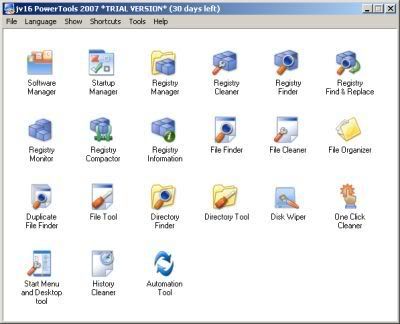
The new and improved jv16 PowerTools is an easy-to-use Windows optimization suite and registry cleaning toolkit containing 21 different tools which allow you to keep your computer running smoothly and error-free.

The Registry Cleaner of jv16 PowerTools is not just "a registry cleaner" but "the registry cleaner". The feature uses advanced stateful registry scanning technology which means it doesn't scan the registry entry by entry but analyzes it as a whole.

jv16 PowerTools has main tools:
- Software Manager
- Startup Manager
- Registry Manager
- Registry Cleaner
- Registry Finder
- Registry Find and Replace
- Registry Monitor
- Registry Compactor
- Registry Information
- File Finder
- File Cleaner
- File Organizer
- Duplicate File Finder
- File Tool
- Directory Finder
- Directory Tool
- Disk Wiper
- One Click Cleaner
- Start Menu and Desktop Tool
- History Cleaner
- Automation Tool

Homepage
Download (6.08 MB)
Mirror

Apr 23, 2008

Reg Organizer 4.21 Final

Reg Organizer

Reg Organizer® is an extensive and extremely powerful set of Registry tools required for effective System Registry management. This software lets you view, edit and safely clean the Registry. It allows to preview the Registry files you want to import (including the ability to preview files directly from Windows Explorer). Includes Registry cleaner, which will safely compact, repair and optimize the Registry.

With Reg Organizer you can thoroughly search the Registry to find all the keys related to a certain application - Reg Organizer does this job quicker and better than other similar programs. Other Reg Organizer features include the ability to find and replace the Registry entries, automatic Registry cleanup, Disk Cleanup tool, access to many undocumented Windows features. Plug-in expandability gives unlimited possibilities of third party enhancements.

Homepage
Download (2.36 MB)
Mirror

Feb 18, 2008

Madcrosoft Registry Cleaner 2008 6.0

Madcrosoft Registry Cleaner 2008

Clean, repair, and optimize your system with the all new Registry Cleaner software from Madcrosoft UK. Registry Cleaner is the safest and most trusted solution that automatically cleans and optimises your system, frees it from registry errors and unwanted fragmented file entries. One mouse click and Registry Cleaner does the rest, and using Registry Cleaner regularly keeps your PC free from errors and from obsolete, unused or unwanted files.

Because of the regular changes, additions, and deletions that you and your software make to your computer the Windows registry will often have problems. Some of these problems are virtually immaterial and unimportant but others can have very negative effects on your everyday computer use. If you don’t fix these problems then they are likely to get worse and not better. That is where Registry Cleaner can assist you.

Homepage
Download ( MB)
Mirror

Nov 14, 2007

RegVac Registry Cleaner 5.01.08

Photo Sharing and Video Hosting at Photobucket

RegVac is a System Registry cleaner consisting of 10 different tools to clean the registry of unneeded entries and stashes. This utility suite cleans your registry, history lists, recent lists and tips. It also removes 27 of the most common stashes and allows you to add more locations to clean. It finds keys and file lists that may be left over from long deleted files, and removes them. You can use one to add and remove programs, and it includes a system configuration utility. Robo Vac is a bonus tool that with one click of the button cleans up to four sections: Classes, Software, Stash, and File Lists. Robo Scrubber can be set up to run on startup daily, weekly, bi-weekly, or monthly. Some of the tools in RegVac are not available anywhere else. Novice and Expert modes. Automation. Easy to use. Registry Backup, Pack, and Restore.

Homepage
Download (1.12 MB)
Password: www.softarchive.net

Sep 15, 2007

RegDoctor 1.88

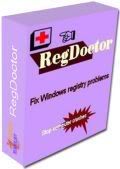
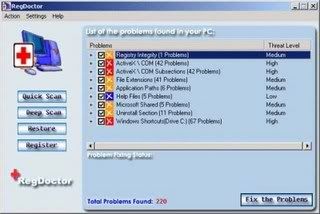
Automatically fix Windows registry problems and improve system performance. Stop computer crashes! Registry problems are the common cause of Windows crashes, error messages, and degraded performance! RegDoctor can safely and quickly clean and repair Windows registry problems with a few simple mouse clicks! RegDoctor uses an intelligent, high-performance detection engine to accurately identify missing and invalid references in your Windows registry. Identified registry problems are listed and rated by risk level using an easy to understand color-coded system for your information.

You can choose to have RegDoctor automatically repair all identified problems, or more selectively choose which problems to repair immediately. RegDoctor also offers a Restore feature to create registry backup files, giving you the capability to safely undo any registry changes.
The auto-start feature of RegDoctor helps to support its regular use. By using RegDoctor regularly to clean and repair your registry, your system should not only be more stable but it will also help Windows and your software run faster.

Homepage
Download (1.99 MB)
Mirror
Mirror
Password: softarchive

Sep 6, 2007

TweakNow RegCleaner Professional 3.0.2

The Registry is a heart and soul of any Windows system. It contains information that controls how your Windows appears and how it behaves. Most applications today use registry to store configuration and other important data. When you install an application, a new registry entries will be created. These entries will automatically be deleted when you uninstall the application. Unfortunately, it does not always work that way. Sometimes, you will find that some applications fail to remove their own registry entries. These entries will become obsolete.


Why using TweakNow RegCleaner Professional?
* Fast: using a high performance engine, TweakNow RegCleaner Pro quickly scan your registry to find obsolete entries.
* Accurate: using complex algorithm TweakNow RegCleaner Pro accurately identify obsolete entries.
* Secure: TweakNow RegCleaner Pro automatically create backup file before deleting obsolete entries from your registry.
* Flexible License: TweakNow RegCleaner Pro available in two licenses, single-user and family.
* Unlimited free updates: We now provide updates for free. 

Changes in Version 3.0.2:
* Improved support for Windows Vista x64.
* Added support for Microsoft Office 2007 and Corel Paint Shop Pro XI in the Track Cleaner module.
* Some other minor improvements.

Homepage
Download (1.59 MB)
Mirror
Password: softarchive

Aug 27, 2007

Registry Clean Expert 4.51

Registry Clean Expert scans the Windows registry and finds incorrect or obsolete information in the registry. By fixing these obsolete information in Windows registry, your system will run faster and error free. The backup/restore function of the tool let you backup your whole Windows Registry so you can use it to restore the registry to the current status in case you encounter some system failure. Besides above, the startup and BHO organizer feature let you manage your startup and IE BHO items with ease, and you can control the programs started with Windows and IE more handy with this feature!
In short, Registry Clean Expert help you get rid of the bloat in Windows registry and achieve a cleaner, faster system..

Main Features of Registry Clean Expert:
- Scan Windows registry and find incorrect or obsolete information in the registry.
- Fix the obsolete information in Windows registry with this Registry Cleaner and boost your Windows performance.
- Make backups for Windows Registry.
- Restore Windows Registry from previous backup.
- Manage the programs started when Windows starts up with the Startup Organizer.
- Manage the IE BHOs with BHO organizer.
- Remove Spyware, Adware and Trojan hidden in your startup items and BHOs.
- A user-friendly interface makes it easy for anyone to use Registry Clean Expert.
. . .

System Requirement:
- Windows Vista, XP, 2003, 2000, ME, 98, XP x64, Vista x64

Homepage
Download (2.13 MB)
Mirror
Password: softarchive.net

Aug 16, 2007

RegDoctor 1.86

Automatically fix Windows registry problems and improve system performance. Stop computer crashes! Registry problems are the common cause of Windows crashes, error messages, and degraded performance! RegDoctor can safely and quickly clean and repair Windows registry problems with a few simple mouse clicks! RegDoctor uses an intelligent, high-performance detection engine to accurately identify missing and invalid references in your Windows registry. Identified registry problems are listed and rated by risk level using an easy to understand color-coded system for your information.

You can choose to have RegDoctor automatically repair all identified problems, or more selectively choose which problems to repair immediately. RegDoctor also offers a Restore feature to create registry backup files, giving you the capability to safely undo any registry changes.
The auto-start feature of RegDoctor helps to support its regular use. By using RegDoctor regularly to clean and repair your registry, your system should not only be more stable but it will also help Windows and your software run faster.

Homepage
Download (1.99 MB)
Mirror
Password: softarchive.net

Jun 9, 2007

jv16 PowerTools 2007 1.7.0.388 Final


jv16 PowerTools has main tools:
- Software Manager
- Startup Manager
- Registry Manager
- Registry Cleaner
- Registry Finder
- Registry Find and Replace
- Registry Monitor
- Registry Compactor
- Registry Information
- File Finder
- File Cleaner
- File Organizer
- Duplicate File Finder
- File Tool
- Directory Finder
- Directory Tool
- Disk Wiper
- One Click Cleaner
- Start Menu and Desktop Tool
- History Cleaner
- Automation Tool

Homepage
Download (1.79 MB)
Mirror

RegDoctor 1.83 + Full Working Key

Automatically fix Windows registry problems and improve system performance. Stop computer crashes! Registry problems are the common cause of Windows crashes, error messages, and degraded performance! RegDoctor can safely and quickly clean and repair Windows registry problems with a few simple mouse clicks! RegDoctor uses an intelligent, high-performance detection engine to accurately identify missing and invalid references in your Windows registry. Identified registry problems are listed and rated by risk level using an easy to understand color-coded system for your information.

You can choose to have RegDoctor automatically repair all identified problems, or more selectively choose which problems to repair immediately. RegDoctor also offers a Restore feature to create registry backup files, giving you the capability to safely undo any registry changes.
The auto-start feature of RegDoctor helps to support its regular use. By using RegDoctor regularly to clean and repair your registry, your system should not only be more stable but it will also help Windows and your software run faster.

Homepage
Download (1.96 MB)
Mirror
Password: trtsoftware

May 26, 2007

RegDoctor 1.82

Automatically fix Windows registry problems and improve system performance. Stop computer crashes! Registry problems are the common cause of Windows crashes, error messages, and degraded performance! RegDoctor can safely and quickly clean and repair Windows registry problems with a few simple mouse clicks! RegDoctor uses an intelligent, high-performance detection engine to accurately identify missing and invalid references in your Windows registry. Identified registry problems are listed and rated by risk level using an easy to understand color-coded system for your information.

You can choose to have RegDoctor automatically repair all identified problems, or more selectively choose which problems to repair immediately. RegDoctor also offers a Restore feature to create registry backup files, giving you the capability to safely undo any registry changes.
The auto-start feature of RegDoctor helps to support its regular use. By using RegDoctor regularly to clean and repair your registry, your system should not only be more stable but it will also help Windows and your software run faster.

Homepage
Download (1.84 MB)
Mirror
Password: trtsoftware

May 23, 2007

Abexo Registry Cleaner 5.0.0.0

Abexo Registry Cleaner is a utility softwareĀ to make your computer run smoother and faster, achieving this by cleaning and compressing the registry. By time Windows registry gathers a lot of invalid entries that cause system complications and slow down your computer significantly. Included in Abexo Registry Cleaner is a registry defragmenter also called compressor which removes the empty spaces after a cleanup and thereby reduces registry size. Registry defragmentation increases the performance of your computer dramatically. Supported platforms: Windows Vista and Windows XP.

Abexo Registry Cleaner Features:
- Disk cleanup
- Scan disk
- Disk defrag
- Registry backup
- Registry cleanup
- Registry defrag
- Computer shutdown/restart

Homepage
Download (1.67 MB)
Mirror
Password: trtsoftware

Apr 14, 2007

Registry Accelerator 5.0.1

Registry Accelerator is the safest and most trusted registry repair software solution to clean, repair, and optimize your system, free it from registry errors and fragmented entries. Through Advanced Error Detection Technology, Free Registry Accelerator automatically identifies missing, corrupt, or invalid items in your Windows registry and dramatically enhance performance and general stability.

* Free Computer From Registry Errors and Fragmented Entries
* Identifies missing, corrupt, or invalid items
* Enhance System Stability and Efficiency
* Repair your PC and keep it tuned

Homepage
Download (1.70 MB)
Mirror (mega)
Password: softarchive.net

Apr 10, 2007

WinASO Registry Optimizer 3.0.8

WinASO Registry Optimizer is an advanced registry cleaner and optimizer for Windows that allows you to safely clean and repair registry problems with a few simple mouse clicks. It scans the Windows registry and finds incorrect or obsolete information in the registry. By fixing these obsolete information in Windows registry, your system will run faster and error free. With a few easy steps, WinASO Registry Optimizer will scan your entire registry for any invalid entries and provide a list of the errors found. You can then choose to clean each item or automatically repair them all after making a backup. WinASO Registry Optimizer can restoring Internet Explorer setting, including IE Home Page, IE Window Title, etc.

WinASO Registry Optimizer is well designed to fix common problems such as denied access to missing drives and disks and illegally modified Internet Explorer pages. Substantial testing has been done on this software to ensure the safety of your system. We have not received any complaints about the system stability.

Support Windows 98/ME/NT(SP6)/2000/XP/XP64/2003/Vista

Changes in Version 3.0.5:
- supports Vista system.
- "Startup Manager" and "Uninstall Manager" have been added to its advanced tools.
- "Privacy Eraser" provides a new function of cleaning the commonly used applications including Firefox, MediaPlayer, RealOne, Acrobat Reader 8.0, WinZip 11.

Homepage
Download (3.52 MB)
Mirror (mega)

RegVac Registry Cleaner 4.02.36 Registed Version

RegVac is a System Registry cleaner consisting of 10 different tools to clean the registry of unneeded entries and stashes. This utility suite cleans your registry, history lists, recent lists and tips. It also removes 27 of the most common stashes and allows you to add more locations to clean. It finds keys and file lists that may be left over from long deleted files, and removes them. You can use one to add and remove programs, and it includes a system configuration utility.

Robo Vac is a bonus tool that with one click of the button cleans up to four sections: Classes, Software, Stash, and File Lists. Robo Scrubber can be set up to run on startup daily, weekly, bi-weekly, or monthly. Some of the tools in RegVac are not available anywhere else. Novice and Expert modes. Automation. Easy to use. Registry Backup, Pack, and Restore.

*** Features:
- Do Spring Cleaning on your Registry - Besides the normal dirt that RegVac and other registry cleaners clean, there are thousands of dirt piles hiding which other registry cleaners don't even attempt to get. You will find them in RegVac's Stash Vac, OpenWith Editor, and AutoComplete Editor. If you want to do a complete job at cleaning your registry, RegVac is the tool to have.
- Fix Broken Software - While RegVac will not fix all broken software, reports are coming in from all over the world about how RegVac has fixed stubborn software problems.
- Novice Mode - safely cleans the Registry with one click of the button.
- Bonus Tool - Automation. One click of the button cleans up to seven sections: Classes, Stash, File Lists, Software, Bad Links, System Config, and Junk. Automation can be set up to run on startup daily, weekly, bi-weekly, or monthly.
- Tool #1 - Classes Vac. Similar to RegClean, Classes Vac cleans the Classes section of the registry.
- Tool #2 - Stash Vac. The registry is littered with history lists, recent lists, and tips. This tool removes 27 of the most common stashes and allows you to add the location of more stashes.
- Tool #3 - File Lists Vac. They abound all through the registry, references to files that no longer exist. This vac finds them and removes them.
- Tool #4 - Software Vac. The largest part of the registry is the Software section. This tool searches through the Software section and finds keys that may be left over from long deleted files.
- Tool #5 - Bad Link Vac. Looks from one end of the registry to the other for references to files that do not exist on your computer. It then allows you to check and remove any of the bad entries.
- Tool #6 - Add/Remove Editor. This is actually the popular program, Add/Remove Pro. It checks your Add/Remove Programs list for programs that have already been deleted and allows you to uninstall programs, remove entries, and test entries.
- Tool #7 - System Configuration Utility. This is a neat little Windows utility otherwise known as msconfig.exe. RegVac will open it for you. One disadvantage of this utility is that it does not actually remove entries from the registry. It only disables them. RegVac will remove entries disabled by msconfig.
- Tool #8 - OpenWith Editor. Lists the extensions that are configured through the Open With... dialog box in Windows and allows you to remove them.
- Tool #9 - AutoComplete Editor. Everytime you type something in a web form, it is saved in the registry. This editor allows you to remove the ones you want to.
- Tool #10 - Junk Key Editor. Spyware and Adware love to put entries in your registry. This tool checks to see of you have any of the common ones and removes them.
- Bonus Tools - Registry Backup, Pack, and Restore. Make full backups of the registry and restore them. Remove fragmentation from the registry files with Registry Pack.
- Undo It. If you want to undo something, Undo allows you to restore all registry settings removed by RegVac. These Undo backups may also be restored outside of RegVac. The RegVac can also delete Vac Bags that are over a week old.
- Keep Windows Running Efficiently.

Changes in version 4.02
- Added more cleaning power, fixed some problems with the Software Vac, and fixed minor bugs.

Homepage
Download (1.16 MB)
Mirror (mega)

Apr 4, 2007

Registry First Aid Platinum 6.0.0 Build 1378

Registry First Aid scans and corrects registry errors. Your Windows® registry will be always clean and correct. Registry First Aid scans registry for orphan file/folder references, invalid font references, obsolete Start Menu items, invalid fonts, shared DLLs, application paths and more...
Registry First Aid finds these files or folders on your drives that may have been moved from their initial locations, and then corrects your registry entries to match the located files or folders. In addition, if your registry has links to files of deleted applications, Registry First Aid will find these invalid entries and remove them from your registry. With Registry First Aid, your Windows registry will be always clean and correct, helping your programs load faster and speeding up your computer.

Not all software un-installations do a complete job leaving behind numerous nagging file references in the Windows registry pointing to files that no longer exist. In time, you can end up with hundreds of these files that may slow down your computer and cause software to lock up, requiring a hard reboot of your computer.
Also, if you've moved your programs from one drive to another, you can break the file links that a program needs. Registry First Aid will find these files and folders that you've moved on your hard drive and help you correct the registry entries that point to them.

Registry First Aid allows you to:
- find and correct:
- invalid file/folder references
- invalid font entries
- obsolete Start Menu items
- invalid application paths
- invalid registered help files
- invalid shared DLL references
- invalid program references in auto run registry keys
- obsolete and unused software registry entries
- invalid known DLL registry references
- invalid file associations
- search the registry for several strings at once
- defragment registry files
- create registry snapshots, find changes made to the registry and create "undo" and "redo" files for any modified registry key
- review folders where invalid registry keys refer
- review registry entries with RegEdit where invalid items reside
- create full registry backups before any changes, so you can always restore your Windows® registry to its initial state
- create small registry backups of modified registry entries, so you can always restore only modified entries
- restore any particular modified registry entry to its initial state
- search for a modified registry entry in all backup files
- save the list of found invalid entries into a text file
- print the list of found invalid entries
- schedule automatic registry scan

Platinum version also allows to control auto-run programs, installed software, "Open With.." dialog, Browser Helper Objects (BHO), Internet Explorer menus and toolbars.

New in version 6.0.0
+ Vista compatibility:
· support running in a least privileged environment;
· support of Vista registry;
+ display snapshot descriptions in registry snapshot lists;
+ new and improved algorithms giving more thorough searches, faster working, and greater reliability;
+ filtering and sorting found registry entries;
* option to scan for errors all user registry hives is available under full administrator only;

Homepage
Download (3.58 MB)
Mirror (mega)
Password: www.softarchive.net

Feb 22, 2007

RegCure 1.1.0.17

RegCure™ (from ParetoLogic®) provides fast and efficient scanning and cleaning of your registry so that your computer can run at an optimal level of performance. RegCure identifies invalid registry items and you decide what items you want to remove. After removing registry entries, you have the option to restore your computer to a previous state.

Protect your investment and ensure maximum PC speed and performance with RegCure registry cleaner. Compatible with all Microsoft products and third party applications, RegCure seeks out and repairs those issues in your registry that lead to poor performance such as remnants left behind on your registry from failed installations, incomplete un-installations, disabled drivers, and spyware applications.

RegCure enables you to fix your PC's windows registry in the way that is most comfortable for you. Clean your registry manually according to your own specifications or perform a thorough scan and clean it automatically!

The user-friendly interface allows you to monitor the progress of your scan, schedule RegCure to scan at the times that are best for you and will even manage and clean up your start up programs for you if you wish.

RegCure offers the following features and benefits:
* Custom scans: you can customize how RegCure scans your registry by selecting only the items you want to be scanned. There is a list of registry items that you can check or clear during step 1 of the scanning process.
* Automatic scanning with the scheduling tool: with RegCure you can create schedules so that a registry scan is done automatically. Using the schedule feature you can set more than one schedule to run daily, weekly, monthly, at system startup, and more.
* Selection and removal: You can choose which items RegCure has detected after it completes the registry scan. In step 3 of the process, you can clear the items that you do not want removed.
* Ignore list: RegCure offers you the ability to ignore items that have been detected after the registry is scanned. In this way these items will be ignored for subsequent scans. There is an Ignore list that you can manage should you want to have these items scanned and removed in the future.
* Automatic repair: RegCure offers you the ability to perform an automatic repair of detected items after a scan. You can configure the settings so that a repair of detected items occurs after each scan.
* Backup and restore: An automatic backup is created every time you use RegCure. You can restore the items that were removed.
* Startup management: RegCure offers quick and easy access to all the programs that are launched when you start your computer. You can enable and disable applications in the Manage Startup list.

Warning: Making changes to the registry can cause irreversible damage. You need to proceed cautiously and be certain of what you are doing.

Homepage
Download (1.02 MB)
Password: www.softarchive.net

Feb 8, 2007

RegVac Registry Cleaner 4.02.30 Retail

RegVac is a System Registry cleaner consisting of 10 different tools to clean the registry of unneeded entries and stashes. This utility suite cleans your registry, history lists, recent lists and tips. It also removes 27 of the most common stashes and allows you to add more locations to clean. It finds keys and file lists that may be left over from long deleted files, and removes them. You can use one to add and remove programs, and it includes a system configuration utility.

Robo Vac is a bonus tool that with one click of the button cleans up to four sections: Classes, Software, Stash, and File Lists. Robo Scrubber can be set up to run on startup daily, weekly, bi-weekly, or monthly. Some of the tools in RegVac are not available anywhere else. Novice and Expert modes. Automation. Easy to use. Registry Backup, Pack, and Restore.

Changes in version 4.02
- Added more cleaning power, fixed some problems with the Software Vac, and fixed minor bugs.
Homepage
Download (1.2 MB)
Password: www.softarchive.net

Feb 7, 2007

Glarysoft Registry Repair 2.0

Problems with the Windows registry are a common cause of Windows crashes and error messages.Registry Repair allows you to fix your registry and optimize your PCs performance.With a few easy steps, you are able to find problems caused by invalid entries, references and links in the Windows registry and provides a list of the errors found, you can then choose to selectively repair each item or automatically repair them all.

Registry Repair uses a high-performance detection algorithm to quickly identify missing and invalid references in your Windows registry. These problems can occur for many reasons including being left-behind after the un-installation or incorrect removal of software, by missing or corrupt hardware drivers, or orphaned startup programs.

Features:
* Scan the registry using a highly intelligent engine that finds invalid registry entries .
* A simple, user-friendly interface with which you can safely repair invalid entries in your Windows Registry.
* Improving system performance and stability by removing orphaned references in your Windows Registry.
* The automatic creation of Windows Registry backups, with the option to restore them.
* Remove invalid registry entries
* Find where the error occurred from the registry tool (Regedit).
* Remove Adware and Spyware that use the registry to spread and do damage.
* Export found programs list to file.
* and more...

Homepage
Download (2.4 MB)
Password: www.softarchive.net