Amaranth - Nightwish - 2007

Showing posts with label Recovery. Show all posts

Sep 12, 2007

Active@ File Recovery 7.1 Build 903
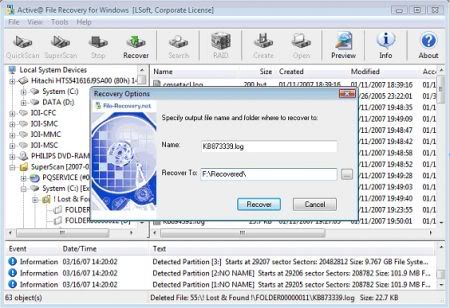
Active@ File Recovery is a powerful software utility, designed to restore accidentally files and directories, that have been lost or deleted from your Windows system. Using Active@ File Recovery for Windows you will be able to recover lost or deleted files. The utility scans computer hard drives in minutes and displays all files which can be recovered. It allows you to recover files that have been deleted from the Recycle Bin, as well as those deleted after avoiding the Recycle Bin (e.g. Shift-Delete) and allows you to recover data after formatting or loss of partitions. Active@ File Recovery will also undelete files that have been lost by damage, virus or directory destruction.

Features:

Supports FAT12, FAT16, FAT32, NTFS, NTFS5, NTFS+EFS file systems
• Designed for Windows 98 / ME / NT / 2000 / XP / XP Professional x64/ XP Home x64 / 2003 Server x64 / Vista
• Supports IDE / ATA / SCSI drives
• Supports all types of Flash Memory Cards
• Supports advanced search of deleted files
• Supports localized and long filenames
• Supports compressed, encrypted and fragmented files on NTFS

Recovers files from deleted, damaged, formatted or reformatted partitions
• Extended scan detects deleted primary partitions and logical drives
• Scans partitions damaged by virus or with damaged MBR
• Recovered files and folders can be saved on any local or network drives

Supports Disk Images Reservation
• Creates Disk Image for logical and physical drives
• Opens Disk Image and recovers files from it as from regular drive
• Disk Image is created in raw format that is compatible with other utilities

Homepage
Download (2.6 MB)
Mirror
Mirror
Password:
softarchive

Sep 6, 2007

O&O FormatRecovery 4.1.1146

With the new O&O FormatRecovery 4, O&O offers the ultimate supplement to the already impressive line of data recovery products. O&O FormatRecovery 4, guided by an on-screen Assistant, enables the recovery of deleted or formatted partitions or hard disks to their pre-deletion form. file and directory information is likewise restored. By use of a specially developed algorithm, O&O FormatRecovery 4 can search for files through formatted or deleted disks and restore them even when the data are heavily fragmented! In contrast to O&O UnErase 4 and O&O DiskRecovery 4, O&O FormatRecovery 4 can also restore files with missing directories and configuration information.

Important Features at a Glance:
* Recovery of files and directories
* Supports all Windows file systems (FAT, FAT32, NTFS and NTFS5)
* Supports all Windows storage volume types: hard disks, removable media, memory cards, digital cameras
* Unique: fragmented files can also be recovered
* Recovery of hidden or system files incliding data atributes
* Assistant leads you step-by-step through teh entire data rescue process
* Specially developed algorithm to recover data from an entire storage volume
* Includes O&O InstantFormatRecovery 4.1 for data rescue without installation
* Runs under all versions of Windows Vista, XP, 2003 and 2000

Homepage
Download (2.41 MB)
Mirror
Password: softarchive

Aug 27, 2007

Windows Key Enterprise Edition 7.9.2141 ISO

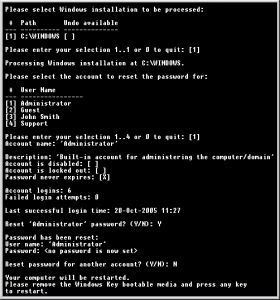
Windows Key is a program to reset Windows security if Administrator password, secure boot password or key disk is lost. Windows Key creates a special boot disk: CD, USB Flash Drive or a driver floppy. Loaded during the boot process, Windows Key instantly resets account passwords and Windows security settings.
General Features
* 100% recovery rate
* All passwords are reset instantly
* Resets passwords with a driver floppy, bootable CD-ROM or USB drive
* Resets local policy settings
* Displays account properties
* Supports all Service Packs

Download (5.20 MB)
Mirror
Password: softarchive.net

R-Studio Network Edition 4.0.124049

R-Studio - the most comprehensive data recovery software and undelete tool supports FAT12/16/32, NTFS, NTFS5 (created or updated by Win2000), Ext2FS (Linux) file systems and recovers files both on local logical and physical disks and disks on remote computers over the networks, even if their partition structures are damaged or deleted. Unformat, unerase and file recovery after FDISK, MBR destruction, FAT damaged, virus infection. Creates drive image for further data recovery operations. Dynamic disk support. Damaged RAID (Volume and Stripe sets) reconstruction. Recovering encrypted files, compressed files and alternative data streams.

File or disk content can be viewed and edited in the hexadecimal editor, which supports NTFS file attribute editing. R-Studio was created thanks to new unique technologies. Flexible parameter settings give you absolute control over data recovering.

New additional file recovery algorithm increases the quality of file recovery and recovers files not recognized in file system metadata. Dynamic disk and RAID are supported as well as recovering encrypted files, compressed files and alternative data streams.

Files and file systems structures (NTFS/FAT boot sectors, MFT file record, MBR, LDM structures, etc) can be viewed and edited in
the professional disk hex editor.

Homepage
Download (5.28 MB)
Mirror
Password: softarchive.net

Aug 17, 2007

MediaRECOVER 4.0.0.8sm

MediaRECOVER™ is a complete digital image and file recovery utility. The program recovers your lost files including photos, audio, video, PDF's, Office Files, tax spreadsheets, etc. from hard drives and removable media used in digital cameras, PDA's and other storage devices.

New MediaRECOVER™ Version 4.0 Features:
* Greatly improved partition and hard drive support
* A new recovery method added for faster and more accurate recovery of hard drives
* RAW image file preview
* Photo data detail preview added
* Included support for over 200 high-end digital camera RAW formats (list of supported cameras)
* Localized for Spanish, Italian, German, French, Czech, Turkish, Russian, Polish, Korean, Japanese, Traditional Chinese and Simplified Chinese languagues

Recovers over 250 file types, partial list:
* Images - jpg, tif, png, gif, bmp, exif
* RAW Image files- Canon crw, Casio cam, Fuji raf, Hasselblad, Kodak dcr, Leaf mos, Leica, Minolta mrw, Nikon nef, Olympus orf, Panasonic, Pentax pef, Phase ONE AS, Ricoh j6i, Sigma x3f, Sony srf, sr2, raw, dmg
* Audio/Video clips - avi, mov, mpg, mpeg, aif, aiff, dvf, m4b, iso, asx, midi, rm, ra, 3gpp, 3gpp2
* Email files - eml, nsf, url
* Document files - doc, xls, hlp, lwp, rpt, wri, vss, vsd, vst, mbx
* Archive files - zip, rar, bkf, jar, gz, gzip
* Graphic files - emf, jp2, epx, dwg, ai, fh8-fh11
* Database files - mdx, prm
Recovers lost files from the following:
* Digital Camera Media: Secure Digital, xD Picture Card, CompactFlash, Memory Stick, SmartMedia, Microdrive, Flash Card, PC Card, Multimedia Card and others
* Zip Disks and floppy disks
* Hard drives: FAT 12, FAT 16, FAT 32 and NTFS file systems. SSD, Solid State Hard Drives.

Homepage
Download (5.16 MB)
Mirror
Password: softarchive.net

EWorld Easy Photo Recovery 2.1

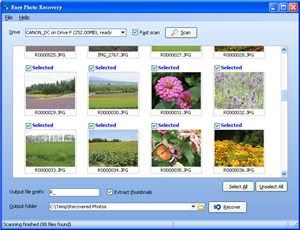
Easy Photo Recovery provides you a handy tool to recover deleted photos from memory cards. The simple interface yet dedicated recovery logic helps you to recover lost images from digital media like Compact Flash, SD, MMC, memory stick, etc from any manufacturer.

# Ease of Use
Easy-to-use user interface. Two scanning modes available to effectively and efficiently recover the deleted photos.

# Recover Original Filename
Recover original filename even in 'Complete Scan' (sector scanning) mode, which is hardly found in other similar products in the market.

# Try before Buy
Trial version allows you to save your pictures and AVI video (reduced resolution/duration) to ensure proper recovery.

# Thorough Recovery
Specially designed logic to recover as many photos/videos as possible from your digital media.

Homepage
Download (2.65 MB)
Mirror
Password: softarchive.net

Jul 9, 2007

Easy-Undelete 3.2 Retail

Easy-undelete is a powerful and easy to use data recovery and undelete solution for Windows. Easy-Undelete can recover lost files and folders on NTFS and FAT volumes or on any physical storage device, and can preview images and binary files before recovery.

A quick overview of Easy-Undelete:

  • Deleted file and folder recovery from NTFS, FAT32, FAT16 and FAT12 volumes, or any physical storage device - including memory cards, Disk-On-Key drives (thumb-drives), ZIP disks, etc., and reformatted volumes, repartitioned volumes, and drives with non-Windows partitions, such as Linux or OS X partitions.
  • Three scanning methods, optimized for fast scanning and reliable recovery.
  • Image preview for many common formats, including JPEG, PNG, TIFF, and more.
  • Hexadecimal preview with cluster viewer.
  • A familiar and easy to use Explorer-like interface, including advanced search capabilities.
  • Unicode core, for reading and successfully recovering file and folder names in any language
  • Fully compatible with All Windows versions (95OSR2, 98, ME, NT, 2000, XP, 2003 and Vista)
Homepage
Download (1.85 MB)
Mirror
Password: trtsoftware

Jun 27, 2007

OfficeRecovery Enterprise 2007

This is data recovery software to fix damaged Office documents, restore lost emails and mailboxes, repair databases and retrieve files from crashed hard disks and bad diskettes. OfficeRecovery Enterprise integrates all 41 data recovery programs offered at OfficeRecovery.com. When looking for a top of the line set of recovery tools accompanied by an extensive upgrade plan, OfficeRecovery Enterprise is the right choice.

- Recovery for Word - Recovers Word documents
- Recovery for Excel - Recovers Excel spreadsheets
- Recovery for OneNote - Recovers OneNote files
- Recovery for PowerPoint - Recovers PowerPoint presentations
- Recovery for Access - Recovers Access databases
- Recovery for Publisher - Recovers Publisher publications
- Recovery for Outlook - Recovers Outlook mailboxes
- Recovery for OutlookExpress - Recovers Outlook Express mailboxes

Homepage
Download (17 MB)
Mirror
Password: trtsoftware

Mar 30, 2007

O&O DiskRecovery 4.1.1334

O&O DiskRecovery V4 is the new and enhanced product developed by O&O for its professional Data Recovery line-up. O&O DiskRecovery V4 uses the most modern technology to put data recovery for almost every form of data loss at the user’s disposal. The new version offers support for an increased range of files, better support for user signatures and a new preview function for various types of files.

O&O DiskRecovery V4.1 functionality begins where other programs leave off. This software combs every sector of a hard disk, memory card, or digital camera to find lost files. Even when files systems are formatted or destroyed, it is possible to reconstruct once deleted data.
Over 350 file types can be recognized and restored, including Word documents, Excel workbooks, Access databases, and virtually every sort of commonly used graphics, photo, movie, and music formats (JPEG, AVI, MPEG, MP3, WAV, BMP, TIFF, Corel Draw, Photoshop, Framemaker, Adobe Illustrator, and many more). Don't give up on lost data! O&O DiskRecovery can still help even when things look hopeless.

O&O DeepScan
O&O DeepScan makes it possible to locate even the smallest of files deleted from critical locations such as the Master File Table. Even such tiny files can now be recovered as O&O DeepScan deploys the maximum depth for scanning.

O&O SmartScan
O&O SmartScan solves the common problem during a data recovery that existing files are recovered as well as the deleted ones. O&O SmartScan has a filter that excludes existing files, significantly accelerating the scan and recovery process.

O&O RawScan
Should the deleted data be on a formatted data storage medium, by activating O&O RawScan the file system is ignored in the search, allowing even files on such media to be capable of rescue.

Now with more than 300 file types
The number of file types supported by O&O DiskRecovery V4.1 has been increased in the new version. One most notable addition is the support of OLE2-file types which improve the detection and reconstruction of Microsoft Word and Excel documents. You can increase the number of file types at any time by creating or integrating user-defined signatures. The creation of such user defined signatures now supports the integration of placeholders in a signature's code. Using this advanced signature function any type of file can now be integrated into O&O DiskRecovery V4.1.

New: Preview function
Upon completion of the scanning process it is now possible to preview the recovered data. O&O DiskRecovery V4 supports various picture and text formats for the preview function including JPEG, BMP, TIF and many more.

Supported storage media
O&O DiskRecovery V4.1 can recover data from all Windows supported data storage media. This includes, amongst others, internal und external hard disks (IDE, SATA, SCSI etc.), Digital cameras, MP3-Players, USB and Memory-Sticks, Memory Cards, CDs, DVDs und Diskettes. The only condition for a data recovery is that the data storage medium is recognized by Windows. However, it is not necessary to carry out a compatibility check through Windows in this regard. The rescued data can then be saved on any windows supported storage medium, provided it is not the medium from where the data was just recovered.

O&O DiskRecovery Highlights:
- Supports 64-bit versions and Microsoft Windows Vista
- Preview of files prior to recovery
- Definable size parameters for recovered data
- Recognizes and restores over 350 File types
- The unique O&O DeepScan locates even the smallest file
- User-defined signature with HexEdit control
- Supports ATA IDE/EIDE- and SCSI-Hard Drives, Diskettes and removable drives as well as Memory Cards and most Digital Cameras
- O&O SmartScan accelerates and simplifies the Recovery Procedure
- O&O InstantDiskRecovery V4 for data recovery without prior installation
- Even recovers data on storage media on which files have been damaged or destroyed by malfunctioning software

Operating System: Windows Vista, XP, 2003/2000, NT 4.0

Homepage
Download (3.69 MB)
Mirror (mega)
Password: www.softarchive.net

Mar 25, 2007

Final Recovery 2.1 - Portable

Final Recovery recovers files whether they have been deleted from the command line, from within an application, Windows Explorer, or removed from the Recycle Bin. Final Recovery will help you to recover files from formatted, lost, deleted or damaged disk partitions. Final Recovery can report health status of your IDE hard drives. This feature give you chance to rescue data before a sudden hard drive failure.

Homepage
Download (1.69 MB)

Mar 16, 2007

Acronis True Image 10.0 Build 4942 Home

Acronis True Image 10.0 Home creates the exact copy of your hard disk and allows you to instantly restore the entire machine including operating system, applications, and all the data in the event of a fatal system crash or virus attack — no reinstallations required!
With the new version you also can easily back up your music, video, and digital photos, as well as Outlook e-mails, contacts, calendar, tasks, and user settings with just a few mouse clicks!

* Copy your entire PC, including the operating system, applications, user settings, and all data using our patented disk imaging technology.
* Backup your music, video, and digital photos!
* Backup your Outlook e-mails, contacts, calendar, tasks, notes, signatures, news folders, e-mail rules and user settings with just a few mouse clicks!
* Restore all the settings for Microsoft Office, iTunes, Windows Media Player and dozens of popular applications!

Main Features :
- Backup. Acronis True Image 10.0 Home provides the maximum flexibility to ensure you are adequately protected and can recover from unforeseen events such as viruses, unstable software downloads, and hard drive failures. Create an exact copy of your PC for a full backup or backup only your important data and application settings — your choice!
- Recovery. Acronis ® True Image 10.0 Home allows you to recover what you need, be it your entire system, an important file, or your application settings. With our recovery choices you will be back to work in no time!
- Management. Acronis ® True Image 10.0 Home provides a number of features that make backing up your PC a breeze. Our automation tools allow the application to do the work for you!
- Storage Media. Acronis ® True Image 10.0 Home provides a wide variety of storage options for your backups allowing you to use existing resources or new ones!
- Tools. Acronis ® True Image 10.0 Home also includes features that allow you to upgrade your computer equipment when you need to!

You've accumulated a lifetime of memories on your home PC, in addition to important personal documents, such as tax returns and resumes, not to mention all the applications you have installed and unique settings for each family member that took countless hours to set up. Acronis True Image 10.0 Home helps makes certain that you are adequately protected; ensuring that you can recover your precious data in case your PC fails or your computer hard disk is damaged by a virus.

* Disk Imaging — Acronis True Image includes our patented disk imaging backup technology. You can copy your entire PC, including the operating system, applications, user settings, and all data. In the event of a system or disk crash, virus attack or other fatal failure you can restore your entire PC in minutes — no reinstallation is required!
* Backup your music, video, and digital photos — Protect your digital memories and music stored on your PC from a fatal system failure. With Acronis True Image you can ensure that these memories are preserved, even if your system fails.
* Outlook backup — Create a backup copy of your e-mails, contacts, calendar, tasks, notes, signatures, news folders, e-mail rules and user settings with just a few mouse clicks!
* Protect your applications — Use Acronis True Image to restore all the settings for Microsoft Office, iTunes, Windows Media Player and dozens of popular applications!

New features introduced in version 10.0 :
- Supports Microsoft Windows Vista — Ensure that you can protect you system if you upgrade to the latest version of Windows
- Backup your music, video, and photos — Preserve your digital memories
- Outlook backup — Preserve your emails, contacts, calendar, tasks, notes, signatures, news folders, e-mail rules and user settings with just a few mouse clicks
- Application protection — Protect your application settings and avoid the time consuming process of redoing your custom settings
- Quick backup of specific files — Initiate backup of specific files without being in the Acronis True Image application
- Restore application settings — Avoid the hassle of customizing your applications again in case of failure
- Explore backups — Easily search and recover particular files in archives just like in Windows Explorer
- Create backup rules — Ensure that you never run out of space by setting limits on the amount of space allocated for backups, the number of backups and the amount of time you keep backups
- Email notifications — Peace of mind by obtaining notification that your backups have completed
- Save to FTP — Flexibility to store your backups where you want to

Homepage
Download (98.7 MB)
Password: www.softarchive.net

Feb 4, 2007

Runtime GetDataBack for FAT/ NTFS 3.03.013

Data Recovery Software for NT file systems - GetDataBack is a highly advanced data recovery software, which will help you to get your data back when your drive's partition table, boot record, Master File Table or root directory is corrupt or lost, when a virus has hit the drive, files were deleted, the drive was formatted or struck by a power failure. GetDataBack comes in two flavours, NTFS and FAT depending on what file system you have.

GetDataBack will recover your data if the hard drive's partition table, boot record, FAT/MFT or root directory are lost or damaged, data was lost due to a virus attack, the drive was formatted, fdisk has been run, a power failure has caused a system crash, files were lost due to a software failure, files were accidentally deleted...
GetDataBack can even recover your data when the drive is no longer recognized by Windows. It can likewise be used even if all directory information - not just the root directory- is missing. GetDataBack can even recover your data when the drive is no longer recognized by Windows. It can likewise be used even if all directory information - not just the root directory- is missing.

The tool works at partition level and will restore files and folders exactly how they used to be. It recovers data from floppy and ZIP disks, drive images and even remote drives connected by a serial cable or TCP/IP. As the name says, it restores files from FAT/ NTFS disks - file system used by Windows NT/2000/XP, yet works on all Windows systems. Make sure you never install the program on the to-be-recovered drive and you will never lose important data.

Advanced algorithms will make sure that all directories and sub directories are put together as they were, and that long file names are reconstructed correctly.
GetDataBack is read-only, meaning the program will never attempt to write to the drive you are about to recover. Please make sure to read the safety instructions...

GetDataBack recovers from: Hard drives (IDE, SCSI, SATA), USB drives, Firewire drives, Partitions, Dynamic Disks, Floppy drives, Drive images, Zip/Jaz drive, Compact Flash Cards, Smart Media Cards, Secure Digital Cards, USB Flash Drive, iPod Disks.

Homepage
Download (7.4 MB)
Password: www.softarchive.net

Jan 25, 2007

R-Studio 3.6 Build 123521

Phần mềm khôi phục dữ liệu bị mất (xóa, format, ...), được đánh giá cao. Có thể phục hồi từ các thiết bị lưu trữ như HD, CD, DVD, floppy disk, Compact Flash Card, USB drive, ZIP drive, Memory Sticks và những thiết bị lưu trữ cầm tay khác.

R-Studio is a family of powerful and cost-effective undelete and data recovery software. Empowered by the new unique data recovery technologies, it is the most comprehensive data recovery solution for recovery files from FAT12/16/32, NTFS, NTFS5 (created or updated by Windows 2000/XP/2003), Ext2FS/Ext3FS (LINUX file systems) and UFS1/UFS2 (FreeBSD/OpenBSD/NetBSD file systems) partitions. It functions on local and network disks, even if such partitions are formatted, damaged or deleted. Flexible parameter settings give you absolute control over data recovery.

R-Studio utilities recover files:
- Deleted without Recycle Bin, or when Recycle Bin has been emptied;
- Removed by virus attack or power failure;
- After the partition with the files was reformatted, even for different file system;
- When the partition structure on a hard disk was changed or damaged. In this case, R-Studio utilities can scan the hard disk trying to find previously existed partitions and recover files from found partitions.
- From hard disk with bad sectors. R-Studio Data Recovery Software can first copy the entire disk or its part into an image file and then process such image file. This is especially useful when new bad sectors are constantly appearing on the hard disk, and remaining information must be immediately saved.

Homepage
Download (5.6 MB)
Mirror
Paid4load
Megaupload
Password: www.softarchive.net